Convert PDF to Audio in 2026: Turn Documents Into Professional Podcasts (10-Minute Method)
Why Converting PDF to Audio Is Your Untapped Revenue Opportunity
Right now, 464 million people worldwide are listening to podcasts. That number's climbing every single month, and here's what most agencies miss: those listeners aren't just consuming entertainment. They're devouring business content, industry reports, whitepapers, and training materials while they commute, exercise, or tackle their inbox.
And you've got clients sitting on mountains of that exact content. In PDF format. Completely locked away from this massive audience.
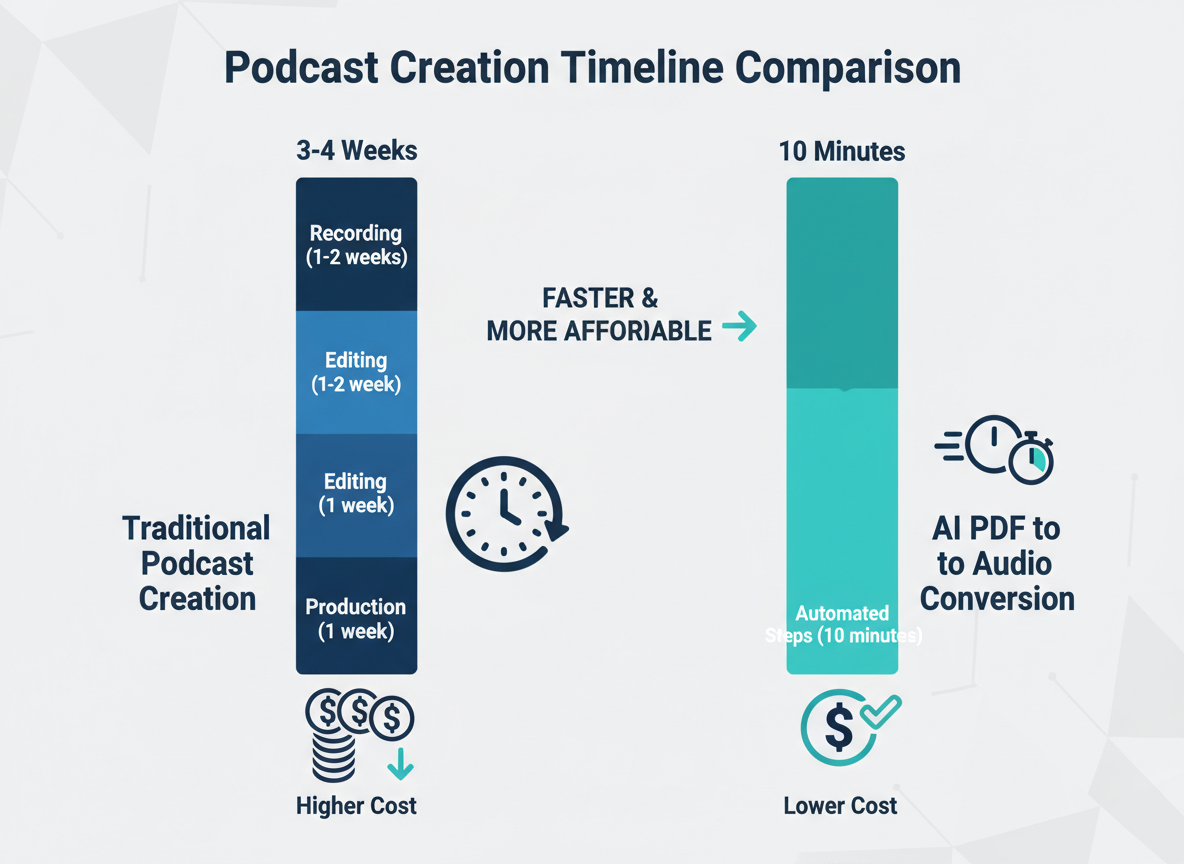
The traditional podcast bottleneck has always been the same nightmare: booking studio time, wrestling with recording equipment, editing hours of audio, hiring voice talent. Most agencies quote 3-5 days minimum for a single podcast episode. That's why even though everyone knows audio content drives engagement, most businesses never pull the trigger.
But here's where the opportunity gets interesting. The landscape's shifted completely in 2026. You can now convert PDF to audio content that sounds professionally produced in roughly 10 minutes. No recording booth. No expensive microphones. No editing marathons that drain your profit margins.
Smart agencies already figured this out. They're adding five-figure monthly retainers by transforming their clients' existing content libraries into podcast series. One freelancer I know converted a law firm's case study PDFs into a podcast series and turned it into a $3,200 monthly contract. The firm now reaches potential clients during their morning jog instead of hoping they'll download a 40-page PDF.
The math here's simple. Your clients already paid to create whitepapers, industry reports, training guides, and thought leadership pieces. That content's just sitting there. By offering AI podcast creation services, you're not asking them to invest in new content creation. You're multiplying the ROI of assets they've already paid for.
Here's what you're about to discover in this guide: the exact technology stack that makes 10-minute conversions possible, how different conversion methods stack up against each other, and the specific profit opportunities agencies are capturing right now. You'll see the complete process from uploading a PDF to publishing professional-quality audio that actually sounds human.
The barrier to entry's never been lower. The demand's never been higher. And most agencies still haven't caught on.
That window won't stay open forever.
Understanding PDF to Audio Technology: What's Actually Happening
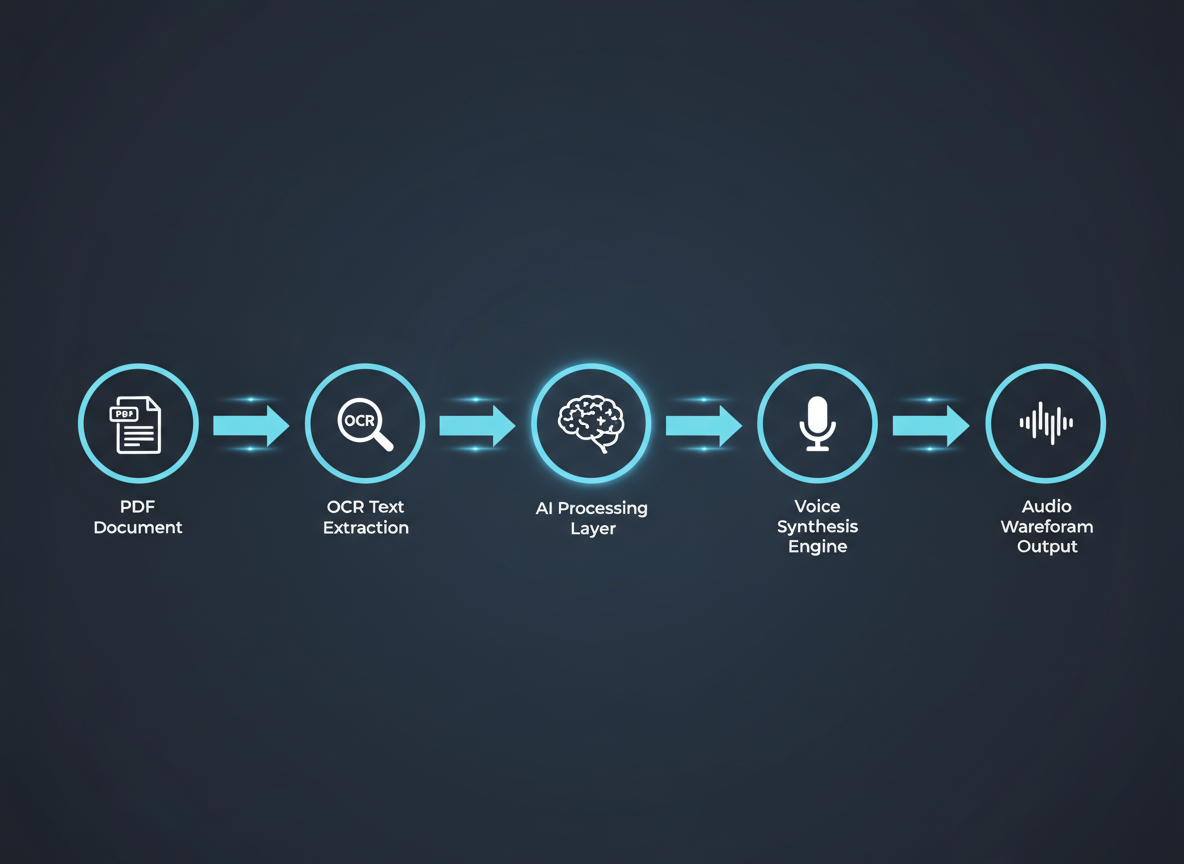
Here's what most people miss: when you convert PDF to audio, you're not just pressing a button and getting sound. You're triggering a sophisticated three-stage process that's evolved dramatically since 2024.
First, your PDF gets scanned through Optical Character Recognition (OCR) software. Think of this as the "reading" phase—the system identifies every character, word, and paragraph structure in your document. Even images with embedded text get decoded. This matters because garbage in equals garbage out. Poor OCR means mispronounced words and awkward pacing.
Then comes the processing layer. Modern systems analyze your text for context, punctuation, and semantic meaning. They're figuring out which words need emphasis, where natural pauses should occur, and how sentences flow together. This is where 2026 technology leaves older systems in the dust.
Finally, neural voice synthesis takes over. This is where the magic happens—and it's a completely different beast than what you knew three years ago.
The Neural Voice Revolution You Can't Ignore
Remember robotic GPS voices from 2018? Those relied on concatenative synthesis—basically stitching together pre-recorded word fragments. Clunky. Lifeless. Instantly recognizable as fake.
Today's neural text-to-speech engines work differently. They use deep learning models trained on thousands of hours of human speech. These systems don't just read words—they understand cadence, emotion, and conversational flow. When someone says 2026 AI voices are indistinguishable from human recordings, they're not exaggerating.
The technology behind AI voice synthesis technology has hit an inflection point. ElevenLabs, for example, uses a proprietary neural network that generates speech in real-time, adjusting pitch, tone, and pacing on the fly. Their API can clone any voice from just 60 seconds of sample audio. That's not science fiction—it's your competitive advantage sitting on the table right now.
Here's the kicker: voice cloning means you can create entire podcast series in your voice (or any voice you have rights to) without ever stepping near a microphone after the initial recording.
Why Most "Converters" Are Wasting Your Time
Not all PDF to audio tools are created equal. Basic converters spit out monotone audio files. No editing. No music. No professional polish. They're fine if you want to listen to a grocery list while driving.
Professional podcast creation platforms? They're built for monetization. They integrate intro music, chapter markers, dynamic pacing adjustments, and multi-voice capabilities. They export in podcast-ready formats with proper metadata. They understand you're not just converting text—you're building content assets worth selling.
The gap between these two approaches is the difference between a side hustle and a six-figure service business. That gap is closing fast as more people wake up to what's possible.
5 Methods to Convert PDF to Audio (Free vs. Paid Breakdown)
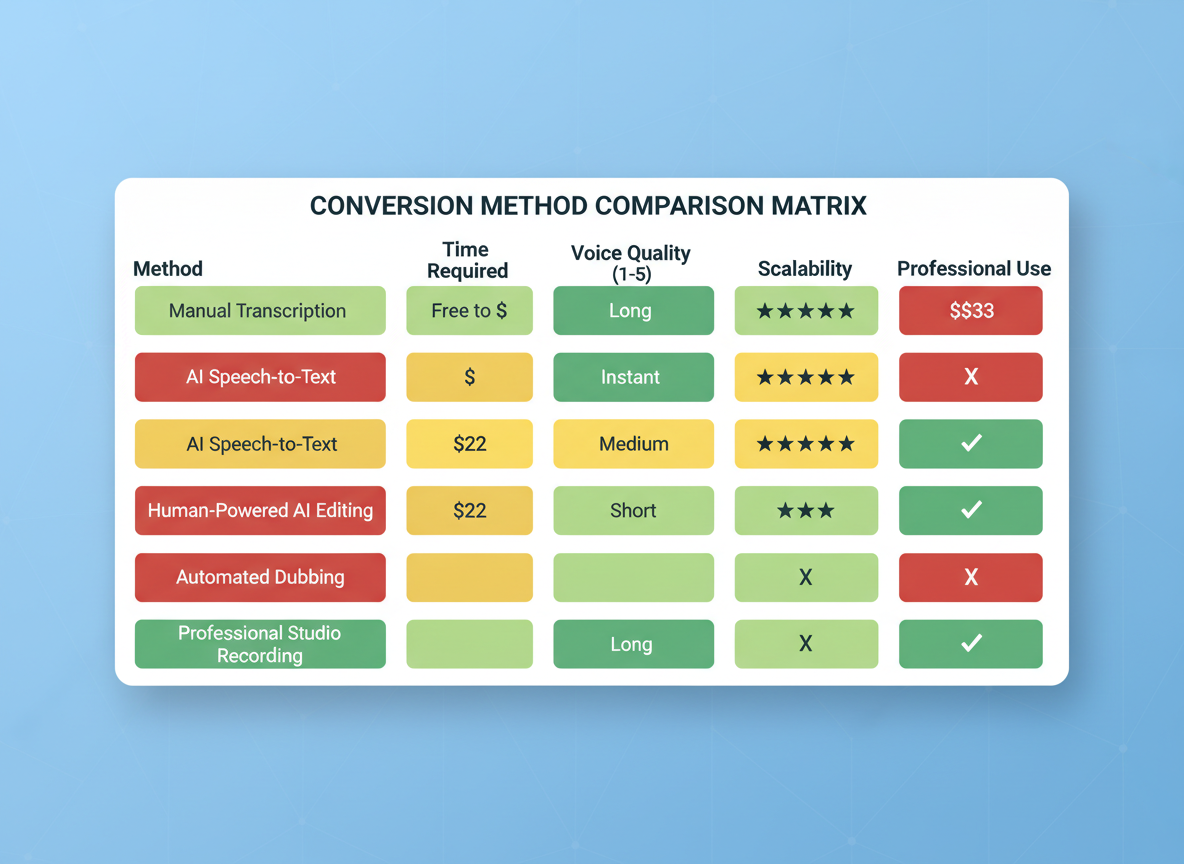
Let's cut through the noise. You've got PDFs sitting there, and you need audio. But here's what nobody tells you: most methods you'll find online will waste your time or produce garbage output that sounds like a robot having a stroke.
I've tested everything. Here's what actually works—and what doesn't.
Method 1: Basic Free Tools (Google TTS, Natural Reader Free)
These are the options everyone tries first. Upload your PDF, click convert, and wait for the magic.
Spoiler alert: there's no magic.
The voices sound mechanical. They mangle anything technical—good luck if your document contains medical terms, legal jargon, or proper nouns. Most free tools cap you at 5,000 words or limit you to three conversions per day. Plus, they'll slap watermarks or ads on your output.
Time investment? About 30 minutes per document, including the frustration of re-uploading when it inevitably fails.
Output quality? Think "dystopian GPS voice" meets "bored teenager reading a phone book."
Method 2: Browser Extensions and Plugins
Chrome and Edge offer extensions that'll read text aloud directly from your browser. Open the PDF, hit play, and technically you're converting PDF to audio.
But you can't export the files. You can't edit the pacing. You're stuck listening in real-time, and the second you close that browser tab, it's gone. These work fine if you personally need to consume content while driving. They're absolutely useless for creating professional content you can distribute.
The accessibility crowd loves these, but they're not built for content creators who need scalable, distributable assets.
Method 3: Premium TTS Software ($20-$100/month)
Now we're getting somewhere. Services like Descript and Speechify offer better voices—some even sound almost human. You'll get proper pronunciation controls, multiple voice options, and export capabilities.
The catch? You're still manually converting each PDF. Upload, format, configure settings, preview, adjust, re-render. Each document takes 45-60 minutes of babysitting. And those monthly fees add up fast when you're processing dozens of documents.
These platforms work beautifully if you've got time to burn and only need occasional conversions. But if you're thinking about offering this as a service to clients? You'll spend more time editing audio than actually running your business.
Method 4: Traditional Podcast Production
Hire a voice actor, book studio time, edit everything manually. This is the "Cadillac option" that agencies have been selling for years at $3,000-$5,000 per project.
The quality? Outstanding. The timeline? Brutal. You're looking at 2-3 weeks minimum from PDF to finished podcast, with hours of back-and-forth on scripts and revisions. Plus, you need expensive equipment and software expertise.
This method makes sense for flagship content or celebrity-backed projects. For everything else? Complete overkill.
Method 5: AI Podcast Creation Platforms
Here's where everything changes. Platforms built specifically for document-to-podcast conversion handle the entire workflow automatically. Upload your PDF, select your voice style, and walk away while AI handles formatting, pacing, and production.
PodGorilla transforms PDFs into broadcast-quality podcasts in under 10 minutes—no technical skills required. You're not just getting audio; you're getting professionally structured episodes with proper hosting, distribution, and even conversational formats.
Head-to-Head Breakdown:
Free tools cost nothing but deliver nothing worth having. Premium TTS platforms run $50-$100 monthly but still demand hours per document. Traditional production costs thousands and takes weeks.
AI platforms? They'll run you $50-$200 monthly depending on volume, but you're processing documents in minutes instead of hours. The quality rivals professional production at a fraction of the cost.
When you're choosing between methods, ask yourself: are you converting PDFs for yourself, or are you building a business? Because only one of these methods scales without breaking your bank or your back.
Step-by-Step: Convert PDF to Professional Podcast in Under 10 Minutes
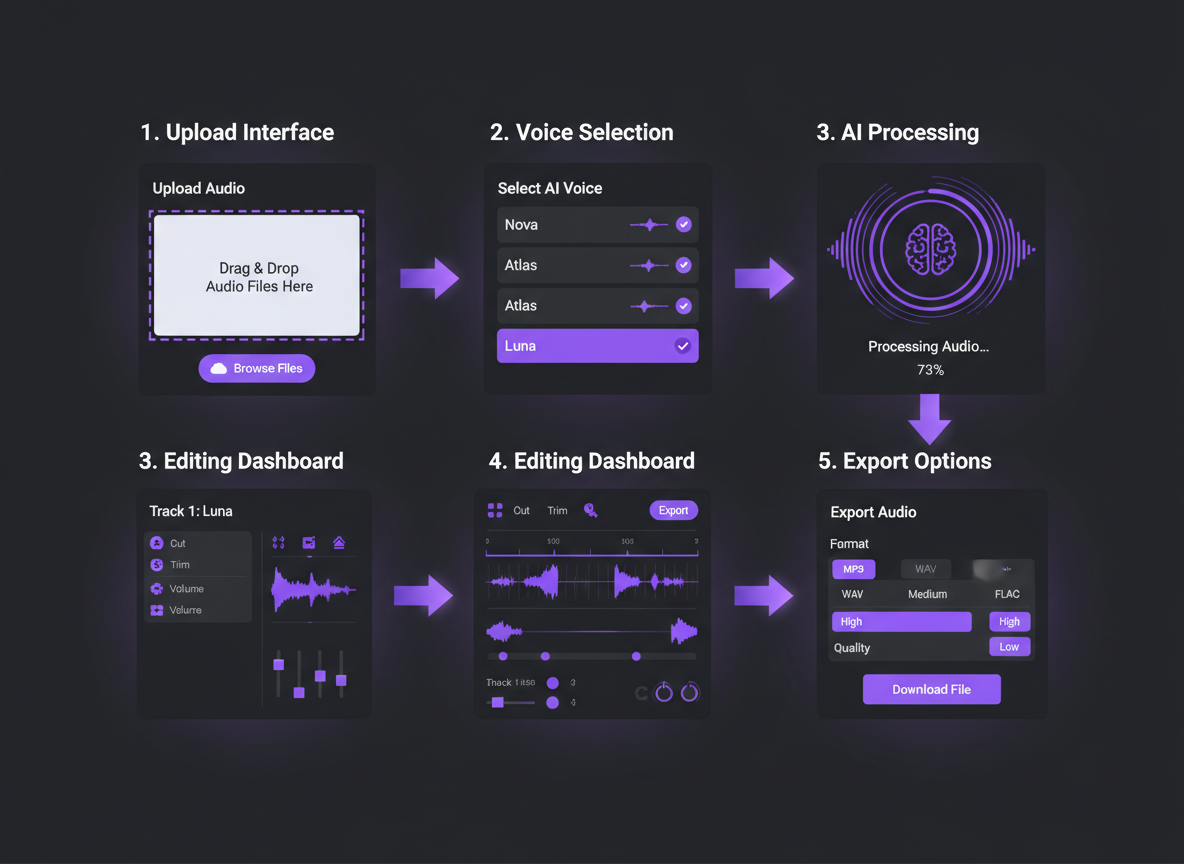
Here's where things get real. You're about to transform those dusty PDFs into cash-generating audio content faster than your competitors can say "content strategy."
Step 1: Upload Your PDF Content
Drag and drop your PDF into PodGorilla. We're talking white papers, case studies, blog posts, research reports—whatever you've got. The platform handles files up to 50MB, but here's a pro move: compress anything over 10MB before uploading. It'll process faster and keep your workflow smooth.
Supported formats include standard PDFs, scanned documents (OCR-enabled), and even text-heavy presentations. If you've got a particularly image-heavy PDF, extract the text first. You want clean, readable content for the best audio output.
Step 2: Voice Selection
This is where you separate yourself from everyone else churning out robotic garbage. PodGorilla lets you clone your client's actual voice—or yours—using a 30-second sample. Imagine sending a prospect their own white paper as a podcast in their voice. That's the kind of thing that closes deals.
Don't have a voice to clone? Choose from 60+ professional voices across different accents, ages, and tones. Pick someone authoritative for legal content, warm and engaging for healthcare, sharp and dynamic for business strategy. Match the voice to the message.
Step 3: Generate Audio and Video Podcasts
Click generate and watch PodGorilla work. You'll get the audio podcast first—perfect for Spotify, Apple Podcasts, and every other platform. But here's the kicker: add an AI avatar for video podcasts. Your content can now live on YouTube, LinkedIn, and social media with a professional host delivering the message.
The platform automatically formats everything for distribution. Episode artwork, RSS feeds, metadata—all handled.
Step 4: Review and Customize
Listen through once. You'll probably be shocked at how good it sounds right out of the gate. But if you want adjustments—and you should for premium client work—tweak the pacing where technical terms appear. Adjust emphasis on key statistics or findings. Change the tone for different sections.
PodGorilla's editor lets you mark sections for slower delivery, add pauses for dramatic effect, or emphasize specific phrases. This takes three minutes, tops. If you can create podcasts from blog posts, you can absolutely fine-tune PDFs into broadcast-quality audio.
Step 5: Export and Distribute
Download your MP3 or video file. Upload directly to podcast platforms through PodGorilla's distribution network, or deliver the files to your client. Set up automated publishing schedules if you're managing ongoing content.
Pro Batch Processing Tips
Here's how agencies are scaling this: queue up 10-20 client PDFs on Sunday night. Let them process overnight. Monday morning, you've got a month's worth of podcast content ready for review. Charge $500-1,500 per converted series, spend two hours total on quality checks. That's the kind of leverage that builds six-figure service businesses.
Name your files systematically (Client_Topic_Date), create templates for common industries, and build a voice library for repeat clients. You'll cut your processing time in half within the first week.
Voice Cloning & Customization: How to Match Your Client's Brand
Here's what separates the $500 project from the $5,000 retainer: branded voice assets that sound exactly like your client's established identity.
Your law firm client already has a voice. Maybe it's authoritative and measured. Your financial advisor client? Warm but confident. When you convert PDF to audio using generic text-to-speech, you're throwing away the brand equity they've spent years building.
That changes now.
Modern AI voice cloning technology lets you replicate a client's existing voice without them stepping foot in a recording studio. Send them a simple script to read (5-10 minutes of audio), upload it to your platform, and boom—you've got a custom voice asset that sounds authentically like them. This works brilliantly for thought leaders, company founders, or anyone with an established personal brand.
But here's where most agencies leave money on the table: they don't understand voice selection for clients without existing audio. Each industry demands specific vocal characteristics that build immediate trust. Healthcare content? You need warmth with clarity—patients are processing complex information while anxious. Legal content demands authority without condescension. Financial services work best with confidence balanced by accessibility.
Your platform should offer dozens of professional voice options spanning age ranges, accents, and tonal qualities. A retirement planning podcast needs a different voice than a cryptocurrency newsletter. Match this wrong, and you've got content that technically works but psychologically fails.
Language support opens massive opportunities. Your agency can serve global clients without hiring multilingual talent. Spanish-speaking healthcare providers, French-Canadian legal firms, Australian financial advisors—they all need audio content in their audience's native language. Premium platforms offer accent variations within languages (British vs. American English, for example) because details matter.
Don't overlook the technical controls that separate amateur audio from professional podcasts. Pacing determines comprehension. Tone conveys expertise. Emphasis on specific words changes meaning entirely. When you master these controls, you create consistency across entire podcast series—episode 47 sounds as professionally crafted as episode 1.
Think about your competitive positioning. Most content agencies deliver written reports and blog posts. You're delivering branded audio experiences with custom voice profiles that clients can't create themselves. That's intellectual property. That's recurring value.
The real play? Build a voice library for each retained client. Their onboarding materials, quarterly updates, thought leadership content—all delivered in their consistent, branded voice. When you explore AI voice cloning for podcasts, you're not just adding a service. You're creating dependency on an asset only your agency controls.
Every generic AI voice is a missed upsell opportunity walking out your door.
Supported File Formats & Technical Specifications You Need to Know
Here's what most people don't realize: not all PDFs are created equal, and that matters when you're building a revenue-generating podcast conversion service.
Text-based PDFs are your bread and butter. These contain actual text data you can highlight and copy. They convert seamlessly, maintaining formatting and extracting content with near-perfect accuracy. Think contracts, reports, eBooks, and standard business documents. This is where you'll make most of your money because the conversion happens in minutes.
Scanned PDFs and image-based PDFs are trickier, but here's your opportunity: businesses have mountains of these collecting digital dust. PodGorilla's OCR (Optical Character Recognition) technology reads text from images, scanned documents, and even handwritten notes. The accuracy hovers around 95-98% for clean scans. If you're getting wonky results from old, low-quality scans, run them through a PDF enhancer first or adjust the OCR sensitivity settings.
File size? You're looking at up to 500MB per file for standard processing. Need to handle larger documents or process multiple files at once? Batch processing lets you queue up to 50 PDFs simultaneously. That's how agencies scale this service without hiring additional staff.
Your output options determine your service offerings. MP3 files (128-320 kbps) work perfectly for standard audio delivery. WAV files give you uncompressed, broadcast-quality audio that podcast producers will pay premium rates for. When you understand podcast audio format specifications, you can position yourself as the technical expert who delivers professional-grade content.
Want to dominate the video podcast market? PodGorilla offers MP4 output with AI avatar integration. Your client's legal brief becomes a video podcast featuring a professional avatar delivering the content. Law firms, healthcare practices, and financial advisors are writing checks for this service right now.
The integration capabilities separate weekend hobbyists from serious agency owners. Direct WordPress publishing means you're managing your client's entire content pipeline. Automatic uploads to Spotify, Apple Podcasts, and major hosting platforms? That's a $500-$2,000 monthly retainer sitting right there. RSS feed generation, CMS connectivity, and API access let you build custom solutions clients can't get anywhere else.
This technical foundation isn't just specs on a page—it's your service menu and pricing structure.
Premium Use Cases: Beyond Student Note-Taking (Where the Money Is)
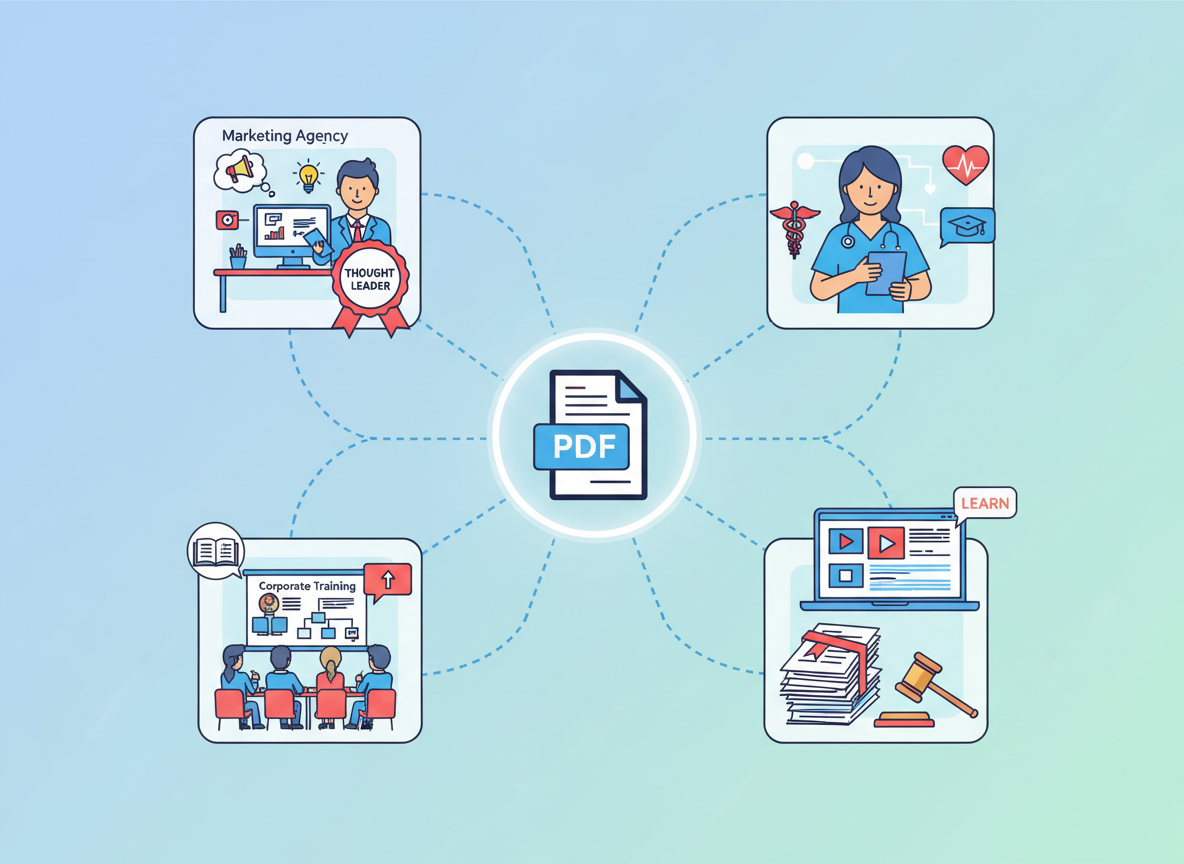
Here's what nobody's telling you about the PDF-to-audio space: students converting lecture notes are just scratching the surface. The real money sits with businesses drowning in written content they've already paid to create.
Think about it. A consulting firm drops $15,000 on a comprehensive white paper. Maybe three hundred people read it. Now imagine that same firm paying you $800 to convert that white paper into a polished podcast episode that reaches thousands more people. That's the opportunity staring you in the face.
Agency Service Expansion Without the Production Nightmare
Marketing agencies are already discovering this goldmine. They're adding podcast creation services without hiring audio engineers, renting studios, or dealing with editing software that requires a master's degree to operate. One PodGorilla user in Austin expanded her content agency's offerings and added $12,000 in monthly recurring revenue within sixty days. She's converting client case studies and reports into podcast episodes at $500-$2,000 per episode, depending on length and customization.
The beautiful part? Her production time per episode is under fifteen minutes.
Thought Leadership on Autopilot
Consultants and specialists sit on mountains of valuable content. Industry reports, research findings, market analysis—all collecting digital dust as PDFs. These professionals understand that authority equals income, but they don't have time to record podcasts the traditional way.
That's where you come in. Healthcare consultants, legal specialists, financial advisors—they're all potential clients who'll gladly pay to convert their expertise into audio formats that build their personal brands while they're busy billing hours.
Corporate Training Meets Compliance
Here's something most people miss: companies face massive accessibility requirements for their training materials. Converting PDF documentation and training manuals to audio isn't just convenient—it's often legally necessary. Corporate clients pay premium rates because this solves both a compliance headache and an engagement problem.
One PodGorilla user specializes exclusively in corporate training conversion. She charges $1,500 per training module and completes three to five conversions weekly.
Content Marketing Multiplication
Marketing teams already create blog content, white papers, and reports. Many are figuring out how to turn webinars into podcasts too. Smart agencies are offering complete content multiplication services—taking everything a client produces in written form and automatically spinning it into audio content.
It's the same value, different format, expanded reach. And clients will pay monthly retainers for this service because it multiplies their content ROI without additional creative work.
The education market deserves mention here too. Course creators and coaches need audio libraries. They've got PDF workbooks, guides, and resources. Converting these into accompanying audio lessons increases course value dramatically—and they know it.
The bottom line? While everyone else fights over the student market, you could be building an agency service that commands premium pricing from clients with actual budgets.
Accessibility Revolution: Serving Visually Impaired and Neurodivergent Audiences
Here's what nobody's talking about: accessibility isn't just a moral imperative anymore—it's a legal minefield that's creating massive demand for audio content services.
The Americans with Disabilities Act isn't optional. Neither are the European Accessibility Act or similar regulations rolling out worldwide. Companies are scrambling to meet compliance deadlines, and the penalties for non-compliance aren't slap-on-the-wrist fines anymore. We're talking lawsuits, reputation damage, and lost contracts.
When you convert PDF to audio, you're not just creating content—you're solving a genuine accessibility problem that affects over 2.2 billion people globally with vision impairment or other reading challenges.
Think about it. A visually impaired attorney can't access your client's white paper. A dyslexic executive struggles through dense industry reports. A neurodivergent researcher finds text-heavy documents overwhelming. Audio versions eliminate these barriers instantly.
Universities are already spending six figures annually on accessibility compliance. Corporate learning departments are retrofitting entire content libraries. Healthcare systems need patient education materials in multiple formats. Legal firms require accessible case documents.
This is your opportunity.
The dyslexic community alone represents 15-20% of the population. They prefer audio because it bypasses the reading struggle entirely. Neurodivergent audiences often process information better through listening. ADHD professionals consume content while multitasking. These aren't small niches—they're massive, underserved markets that desperately need what you're offering.
Here's where it gets interesting: most businesses have zero clue how to handle accessibility compliance for content. They know they need it. They don't know how to deliver it. They're willing to pay premium rates to someone who can solve this problem.
Position your agency as an accessibility-first service provider, and you'll differentiate yourself from every other content shop fighting over the same scraps. You're not just converting PDFs—you're ensuring legal compliance, expanding audience reach, and demonstrating corporate social responsibility.
Educational institutions need course materials accessible. Financial firms need reports available to all investors. Healthcare organizations need patient resources in audio format. Government contractors face strict accessibility requirements.
Every single one of these entities has budgets allocated specifically for accessibility solutions. They're not shopping on price—they're looking for reliable providers who understand the regulations and can deliver compliant solutions fast.
When you frame your service as accessibility compliance rather than just audio creation, you're speaking the language of decision-makers who control significant budgets. You're solving their legal headaches while opening their content to millions of potential consumers who've been locked out.
That's not just good business. That's a market revolution waiting for someone to claim it.
Audio Quality Optimization: Making Your Converted Content Sound Professional
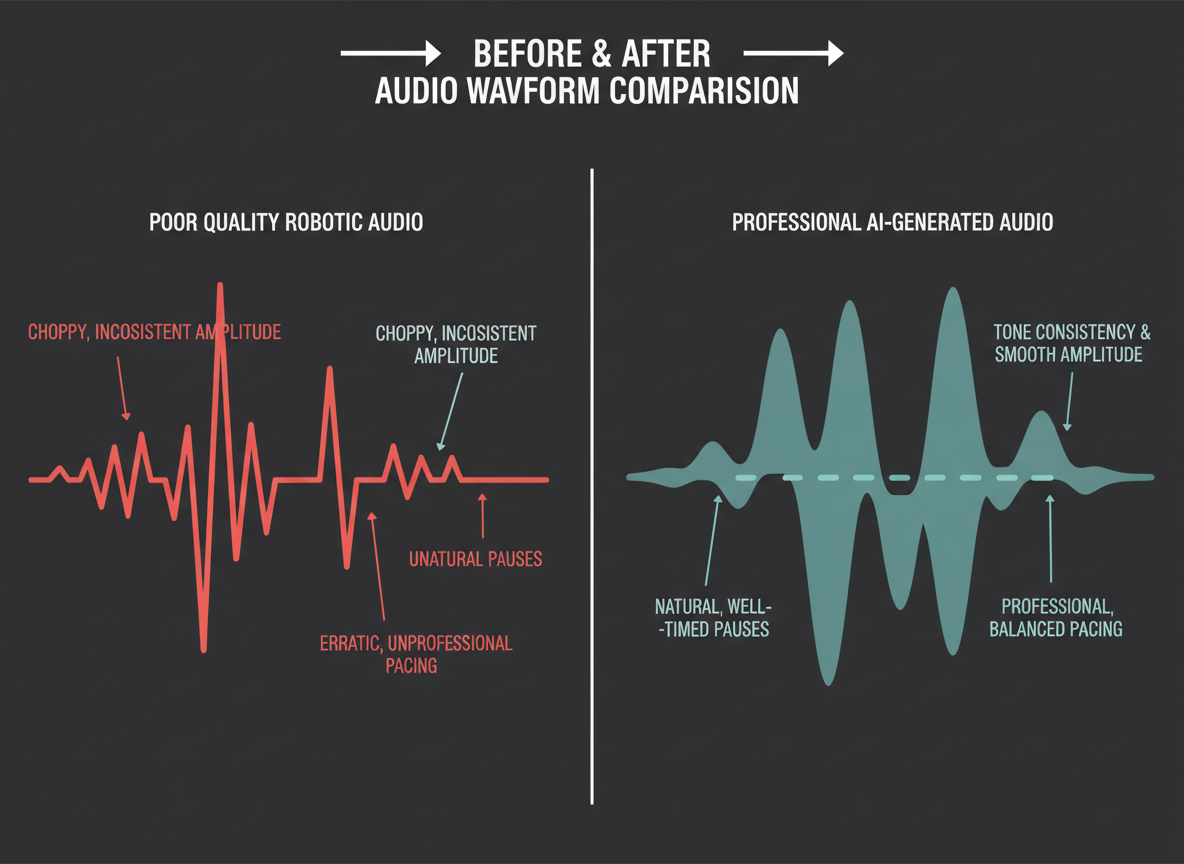
Here's the brutal truth: most people who convert PDF to audio end up with robotic garbage that nobody wants to listen to. And if you're charging premium rates for podcast production, that's not going to cut it.
The difference between amateur hour and professional-grade audio comes down to optimization—before, during, and after conversion. Let's break down exactly how to deliver content that sounds like it came from a proper studio.
Pre-Conversion PDF Optimization
Your output quality depends heavily on your input structure. Before you even think about conversion, clean up that PDF. Remove unnecessary metadata, footnotes, and page numbers that'll sound awkward when spoken aloud. Break up massive paragraphs into digestible chunks. Your AI voice engine can't fix poor formatting—it'll just read everything exactly as written, including copyright notices and figure captions.
Create a dedicated "audio-ready" version of the PDF. Strip out anything that doesn't translate to spoken content. This five-minute prep step saves you hours of editing later.
Voice Selection That Actually Works
Different content demands different voices. A financial report needs authority and credibility—go with a mature, professional tone. Educational content for younger audiences? Pick something energetic and approachable.
Here's what most people miss: consistency matters more than perfection. Once you've selected a voice profile that works for a client's brand, stick with it. That's how you build recognition and trust.
Pacing That Sounds Human
Basic converters rush through content like they're late for a meeting. Professional audio breathes. Insert strategic pauses after complex points. Slow down technical terminology. Speed up conversational transitions.
Most advanced platforms let you adjust speaking rates by section. Use this. A 15% slowdown on dense material makes the difference between clarity and confusion.
Podcast Branding Elements
If you're delivering podcast-ready content, generic audio won't command premium prices. Add a branded intro and outro—30 seconds each. Layer in subtle background music during transitions. These finishing touches transform converted audio into a polished product that clients happily pay $500+ per episode for.
Following podcast audio quality best practices ensures your final product matches what listeners expect from professional shows.
Quality Assurance Checklist
Before delivery, check for:
Awkward pronunciations (especially industry jargon)
Unnatural pauses or rushed sections
Volume inconsistencies between segments
Missing or mispronounced acronyms
Background noise or artifacts
Spend ten minutes on QA. It's the difference between getting paid and getting refund requests. Professional-grade audio when you convert PDF to audio isn't optional—it's your competitive advantage in a market that's about to explode.
Troubleshooting Common PDF to Audio Conversion Problems
You're racing to deliver your first audio project to a client, and suddenly everything breaks. The audio sounds like a robot having a stroke. Half the document didn't convert. Special characters turned into gibberish.
Don't panic—these problems hit everyone, and they're easier to fix than you think.
Scanned PDFs Are Your First Enemy
Here's the thing: scanned documents are just images pretending to be PDFs. Most conversion tools can't read them without OCR (optical character recognition). If your converter spits out nonsense or refuses to process the file, you're dealing with a scanned PDF.
Quick fix? Run it through an OCR tool first. Adobe Acrobat, online OCR services, or even some modern converters have built-in OCR. It adds 30 seconds to your workflow but saves hours of frustration.
When Formatting Goes Haywire
Tables, columns, and multi-column layouts confuse the hell out of text-to-speech engines. They'll read across rows, down columns, and sideways through headers—making zero sense.
Your move: convert those problem PDFs to plain text first. Copy the content into a simple document, clean it up manually, then convert. Yes, it takes five extra minutes. But it's faster than trying to salvage garbage audio.
Pronunciation Nightmares
Client names, technical jargon, industry terms—conversion tools butcher them constantly. "Worcester" becomes "Wor-chester." Medical terminology sounds like alien language.
Most professional tools let you create custom dictionaries. Spend ten minutes adding your client's industry-specific terms, brand names, and commonly used phrases. You'll only do this once per client, and it'll make you look like a genius who delivers perfect audio every time.
File Size Limits Breaking Your Flow
Hit a file size cap on a 200-page report? Split it. Convert in chunks of 50 pages, then stitch the audio files together using free tools like Audacity. Takes an extra three minutes but gets around every limitation.
For length restrictions, same strategy—divide and conquer.
Export Compatibility Headaches
Client can't open your audio file? You probably exported in the wrong format. MP3 works everywhere. M4A works for Apple users. WAV files are huge but universal.
When quality sounds degraded, check your export settings. Most tools default to compressed formats that sound tinny. Bump up the bitrate to 192 kbps minimum, or use WAV for pristine quality.
Our PDF conversion troubleshooting guide walks through advanced fixes for edge cases that'll eventually pop up. Bookmark it—you'll need it when you're scaling to 20 clients a month.
Pricing & ROI: What Professional PDF to Audio Conversion Actually Costs
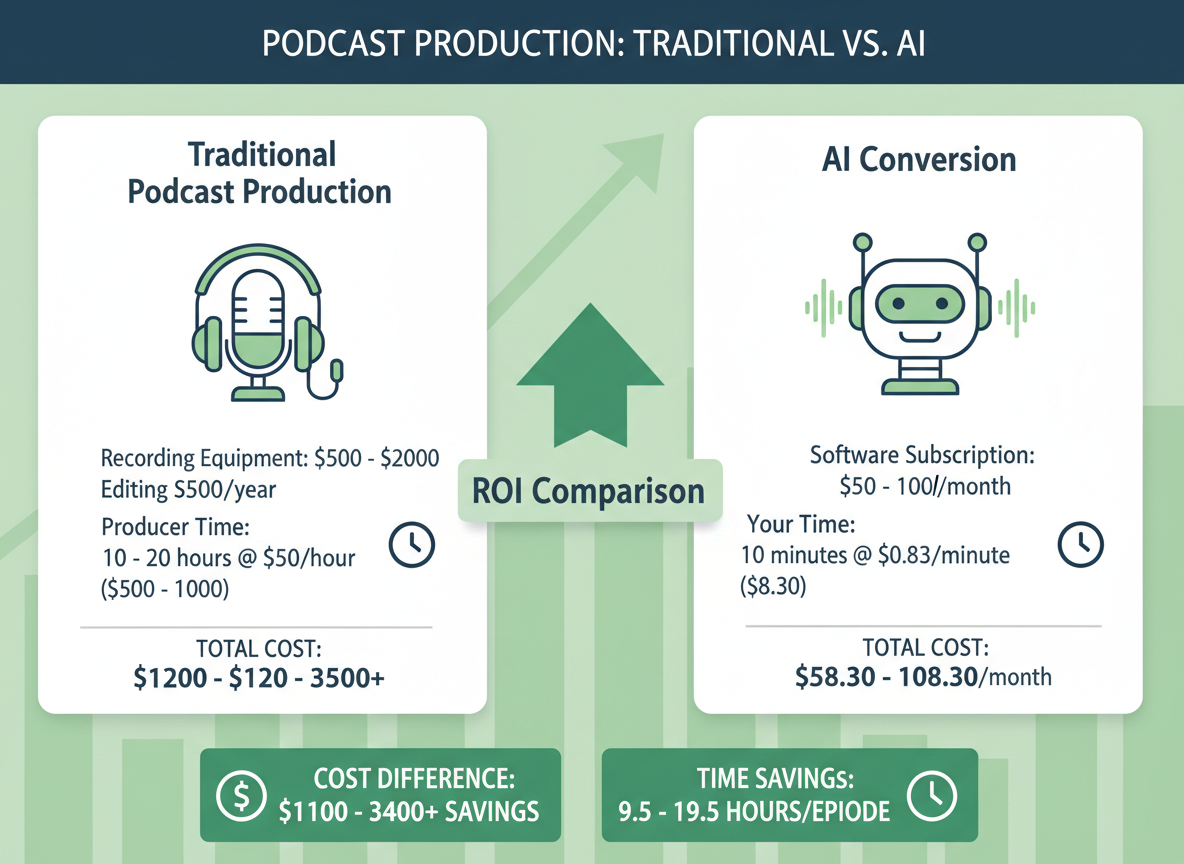
Let's cut through the noise and talk real numbers.
Free tools seem tempting until you've wasted three hours fighting their limitations. You'll hit character caps, deal with robotic voices that sound like they're having an existential crisis, and lose your mind wrestling with file size restrictions. The "free" route costs you something far more valuable than money—your time and your reputation.
Mid-tier solutions run between $20 and $100 monthly, and here's where things get interesting. At the lower end ($20-$40), you're getting basic text-to-speech with maybe 10-20 hours of conversion time. Think decent voices, batch processing, and standard file formats. Nothing fancy, but workable for small-scale operations.
The $60-$100 tier? That's where you'll find professional-grade voices, unlimited conversions, advanced editing tools, and white-label capabilities. This is the sweet spot for agencies looking to scale.
Enterprise solutions start at $200 monthly and climb from there. You're buying speed, volume, custom voice training, API access, and support that actually responds when you need it. If you're converting PDFs to audio for multiple clients weekly, this isn't an expense—it's infrastructure.
Now here's where your calculator should come out.
Traditional podcast production costs between $800 and $3,000 per episode when you factor in script writing, voice talent, recording studio time, and editing. You're looking at 15-20 hours of work minimum. With PDF to audio conversion, you're delivering similar output in under two hours. That's a 90% time reduction.
Smart agencies are already capitalizing on this gap. They're charging clients $500 to $2,000 per converted document-turned-podcast episode. Their cost? Maybe $50 in software and an hour of their time. You do the math.
Let's say you land just three clients monthly who want their whitepapers, reports, or case studies converted into audio content series. That's $1,500 to $6,000 in revenue against maybe $300 in costs. Your podcast production ROI calculator confirms what you already suspect—this is printing money.
But here's the real cost nobody's talking about: the opportunity cost of sitting this one out. While you're debating whether this market's "real," your competitor just signed a year-long contract converting a SaaS company's knowledge base into a podcast series. They'll invoice $24,000 this year for something you could've done in your sleep.
The barrier to entry is laughably low. The profit margins are embarrassingly high. The question isn't whether you can afford to get into PDF to audio conversion. It's whether you can afford not to.
Integration Workflows: Building PDF to Podcast Into Your Agency Stack
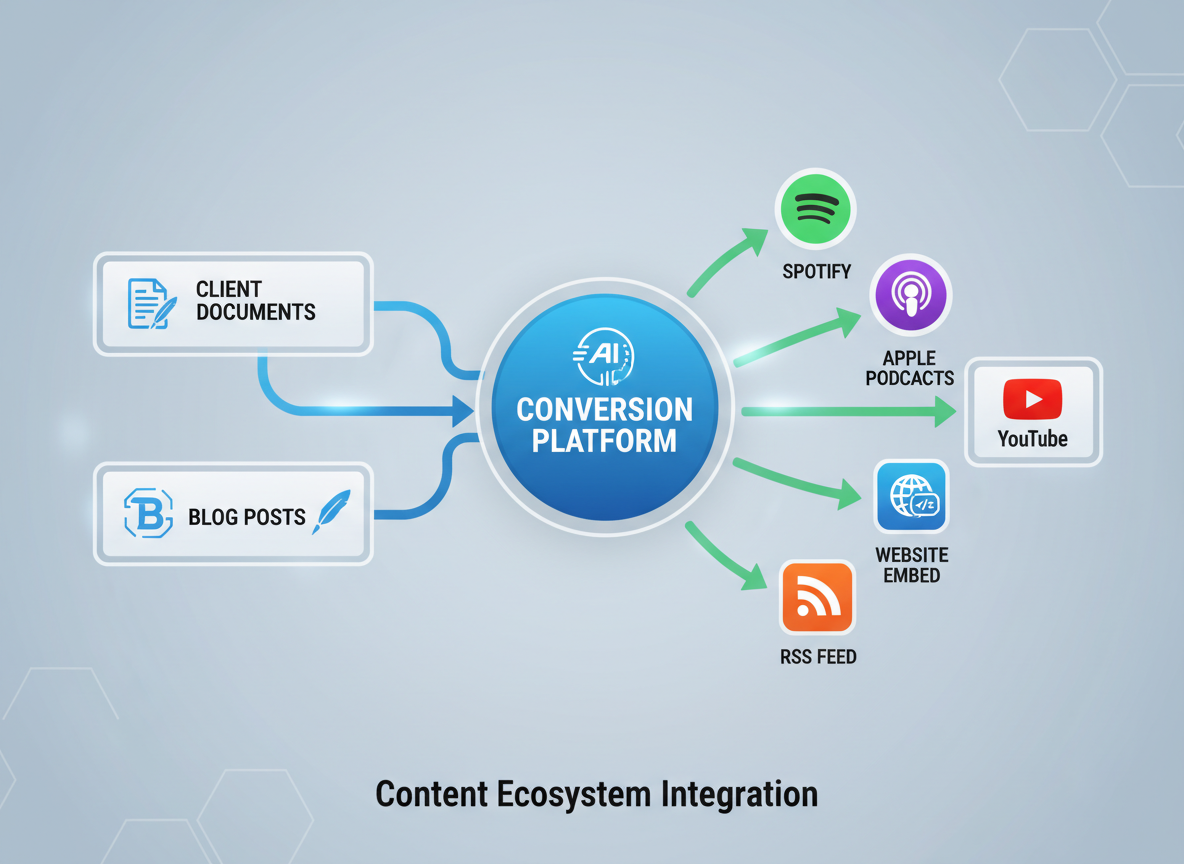
Your agency's already drowning in content. Client blogs, whitepapers, case studies, market reports—all sitting there, begging for repurposing. Here's the uncomfortable truth: while you're manually converting PDFs one at a time, your competitors are building entire productized service packages around automated podcast creation.
Time to flip the script.
PodGorilla's API access turns the simple need to convert PDF to audio into a revenue machine that runs while you sleep. Connect directly to your WordPress or CMS, set up trigger-based workflows, and watch client documents automatically transform into podcast-ready episodes the moment they hit publish.
Here's what smart agencies are building right now:
CMS Integration That Actually Works
Your clients publish a blog post. That content automatically flows into your podcast conversion pipeline, gets transformed using AI-powered podcast creation technology, and lands on their hosting platform—all without you touching a single file. One client publishes fifteen posts monthly. That's fifteen podcast episodes you're billing for with maybe ten minutes of setup time.
White-Label Distribution Workflows
Brand everything under your agency name. Your logo, your custom domain, your pricing. PodGorilla disappears completely from the client-facing experience. You're not reselling someone else's tool—you're running a premium content repurposing service that happens to use sophisticated automation under the hood.
The Productized Service Play
Stop selling hours. Start selling outcomes. Package "Blog to Podcast Transformation" at $497 monthly. Include automatic conversion of up to twenty client documents, distribution to major podcast platforms, and analytics reporting. Your actual time investment? Maybe two hours per client per month for quality control and optimization.
Scalability Through API Access
Custom integrations mean you can plug this into any client workflow. Healthcare providers converting patient education materials. Law firms transforming legal guides. Financial advisors turning market reports into weekly podcast updates. One API, unlimited applications across verticals.
The agencies making six figures from content repurposing aren't doing anything magical. They're just automating what everyone else is still doing manually. Build the workflow once, clone it across fifty clients, and suddenly you're running a content empire instead of a content sweatshop.
Your competitors are figuring this out right now. Question is: will you be leading this shift or reacting to it six months too late?
The 2026 Advantage: Why Now Is The Time to Add This Service
Let's be blunt: you're reading this at exactly the right moment.
Podcast consumption just hit record highs. We're talking 464 million listeners worldwide, with corporate training departments and professional service firms finally treating audio content as essential, not experimental. Meanwhile, the production barriers that kept everyone out? They've vanished.
Here's what makes 2026 different. The technology to convert PDF to audio has matured beyond recognition. Five years ago, AI voices sounded robotic and flat. Two years ago, they were passable. Now? They're indistinguishable from professional voice actors. Your clients can't tell the difference, and neither can their audiences.
But here's the kicker: most service providers still don't know this exists.
You've got a first-mover advantage that's ticking away as we speak. Your local market hasn't been saturated yet. Your industry niche hasn't been claimed. Right now, you can walk into law firms, medical practices, consulting agencies, and be the only person offering to convert their expertise into podcast content. That window closes the moment someone else figures this out.
The client demand is already there. They're watching competitors launch podcasts and wondering how to keep up without hiring production teams or spending hours recording. They've got PDFs stacked up—client guides, research reports, training materials—gathering digital dust. They just need someone to show them the transformation.
The barrier to entry couldn't be lower. You don't need a recording studio. You don't need expensive equipment. You don't need a production team. You need PodGorilla's platform and the willingness to test this in your market this week.
Not next month. This week.
Because agencies are discovering this right now. The smart ones are already pitching existing clients on audio versions of their content libraries. They're packaging it as "podcast content creation" and charging premium rates for what takes them ten minutes per episode.
Here's your action step: take one PDF today and convert it to audio. Send it to a potential client. Test their reaction. You'll know within 48 hours if this works in your market. Spoiler alert: it will.
The question isn't whether you should start your podcast agency. The question is whether you'll do it before everyone else figures out what you now know. The 2026 advantage belongs to whoever moves first.
Frequently Asked Questions
Can I convert scanned PDFs to audio?
Absolutely. Modern OCR (Optical Character Recognition) technology extracts text from scanned documents with shocking accuracy—we're talking 99%+ for clean scans. Here's what happens: the software analyzes your scanned PDF, identifies characters and words, converts them to editable text, then sends that text through the audio conversion engine. Even documents from the 1990s with yellowed pages convert cleanly. The only exceptions? Handwritten notes or severely damaged scans. Those might need minor cleanup, but that's a two-minute fix, not a dealbreaker.
How long does PDF to audio conversion take?
With PodGorilla's 10-minute method, you'll have professional audio in less time than it takes to grab coffee. Traditional methods? You're looking at hours of recording sessions, editing, re-takes, and post-production headaches. We've timed it: upload your PDF (30 seconds), select voice and settings (2 minutes), review and adjust (5 minutes), export (2 minutes). Done. Compare that to hiring voice talent, which involves scheduling, recording sessions, revisions, and waiting days for final delivery. The math isn't even close.
Do AI voices sound robotic or natural?
This isn't your 2018 GPS lady anymore. 2026 AI voice technology produces human-indistinguishable audio complete with natural pauses, emotional inflection, and conversational rhythm. You'll hear speakers take breaths, emphasize key points, and adjust pacing based on content context. The old text-to-speech monotone nightmare? Dead and buried. Today's neural voice models learn from thousands of hours of professional narration, capturing nuance and personality that'll make clients ask, "Who's the narrator?"
Can I use my own voice or a client's voice?
Voice cloning has become stupid simple. Upload 10-15 minutes of clear audio samples, and the AI creates a digital twin that captures vocal characteristics, accent, and speaking style. This opens incredible doors for personal branding—imagine a CEO's voice delivering their company's thought leadership content at scale. Same applies to client voices for personalized customer experiences. The technology's so good that most listeners can't tell the difference between original and cloned recordings.
What file formats are supported for output?
You'll get MP3 (the universal standard), WAV (for pristine quality), and video podcast formats with visual elements. MP3 works everywhere—Spotify, Apple Podcasts, YouTube, websites. WAV gives you broadcast-quality audio for premium applications. Video formats let you create YouTube podcasts with moving avatars or static visuals. Most platforms export multiple formats simultaneously, so you're not choosing between options—you're getting everything in one conversion.
Is there a file size limit for PDF conversion?
Most platforms handle PDFs up to 500 pages or 50MB without breaking a sweat. Larger documents? Use batch processing—split your massive 800-page legal document into logical chapters, convert separately, then merge the audio files. Takes an extra five minutes but handles virtually unlimited content. Some enterprise solutions process thousands of pages in single conversions, though you probably won't need that firepower unless you're converting entire textbook libraries.
How much does professional PDF to audio conversion cost?
Free tools exist but come with robot voices and watermarks. Professional platforms run $29-$99/month depending on volume and features. That's pennies compared to hiring voice talent at $100-$500 per finished hour. For agencies, the ROI's insane—charge clients $300-$800 per conversion while your costs stay fixed at monthly subscription rates. One client project pays for three months of software. The rest is pure profit margin.
Can I create both audio and video podcasts?
Video podcasts have exploded because they dominate YouTube's algorithm. Modern conversion tools add AI avatars that lip-sync to your audio, creating engaging video content from static PDFs. You'll upload your document, select an avatar (professional presenter, industry expert, custom character), and export video-ready files with synchronized mouth movements and natural gestures. Perfect for podcast FAQ segments and educational content that needs visual elements.
What languages are supported?
You're looking at 100+ languages with regional accents. Need Australian English versus British English? Done. Want Castilian Spanish instead of Latin American? No problem. This global reach means converting content for international clients or multilingual audiences becomes standard service rather than special request. The technology handles pronunciation, idioms, and cultural context better than many human translators.
How do I distribute converted audio to podcast platforms?
Direct integrations push your audio to Spotify, Apple Podcasts, Google Podcasts, and YouTube with automated RSS feeds. You're not manually uploading to fifteen platforms—you're clicking one button and watching your content populate everywhere simultaneously. The distribution piece takes less time than the conversion itself.
Can I edit the audio after conversion?
You've got full editing control. Adjust pacing, insert pauses, change voice mid-stream, add background music, remove sections, or completely restructure the flow. Most platforms include built-in audio editors, though you can export to professional tools for advanced production. Nothing's locked once converted—you're working with flexible audio files that bend to your creative vision.
Is this suitable for accessibility compliance?
Audio versions of written content directly address ADA requirements for accessible information. Organizations legally required to provide alternative formats now convert documents in minutes instead of outsourcing expensive transcription services. You're helping clients meet compliance standards while solving legitimate accessibility challenges for visually impaired users and people with reading difficulties.